
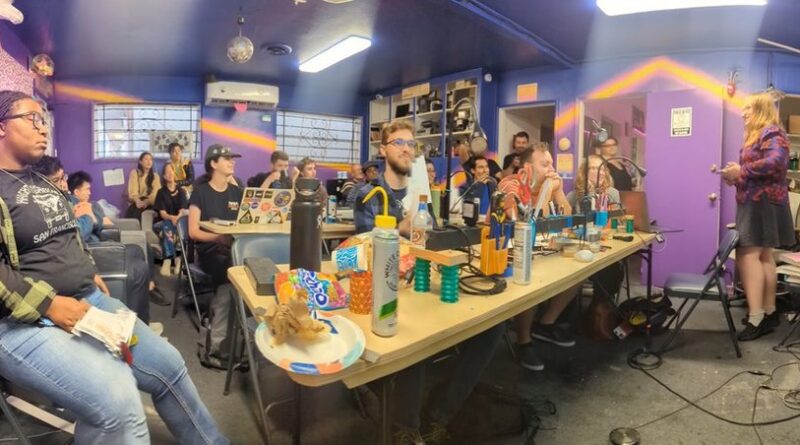
CRASH Space is a community built by people who love sharing what they know, exploring their interests, and bringing people together. Things happen here because people like you make them happen! If you have an idea for an event, meetup, or class, we’re a great space to bring it to life!
You don’t need to be a CRASH Space member to host an event, meetup, or class. Whether you’re interested in starting a recurring meetup, organizing a one-time event, or teaching a skill, this guide will walk you through the process.
Have questions? Reach out to events@crashspace.org. Our Events team checks email and handles event requests and events related work on Tuesdays and Thursdays from 10am-2pm.
Recurring Meetups at CRASH
Have an interest you’d love to share with others? Regular meetups are a great way to bring people together around a common interest and build a community over time.
Meetups can be casual, open-ended gatherings (like a Coding Social) or have a more structured agenda such as our neuroscience meetup selecting a paper to discuss before each meetup.
What to know before hosting
- Plan to host for at least three months. We ask meetup hosts to commit to at least three months of meetups so the community has time to grow.
- You don’t need to be a CRASH member. Anyone can propose and host a meetup.
- New hosts need a co-host. If you haven’t regularly hosted a meetup at CRASH before, you’ll need a co-host who has a CRASH key or experience hosting events with a temp key. They’ll help open and close the space. After you’ve hosted enough events, you may be approved to open and close the space yourself. Need help finding a co-host? Try asking in Discord or emailing the CRASH Space mailing list.
- Keep meetups free and open to the public. We want everyone to have an opportunity to participate. Hosts can request budget support from CRASH for special events associated with their meetup.
- Leave the space ready for the next person. Hosts are responsible for setup, cleanup, and taking out the trash.
How to propose a meetup
Email events@crashspace.org with the following information:
- Your idea: Tell us what the meetup is about and what participants can expect.
- When: Your preferred date and time. For recurring meetups, include the schedule you’d like (for example, every fourth Saturday from 2–4 p.m.).
- Please check the CRASH Space calendar before choosing a time. We ask that there be at least one hour between your meetup and any event scheduled before or after it.
- Your co-host: Let us know who will help you host.
- Additional details: Have you hosted this meetup elsewhere? Do you have event-hosting experience? Is there an existing community you’d like to invite?
Once your meetup is approved, the CRASH Space Events team will add it to the calendar and Meetup.com. Opportunities for promotion can be found under the Promotion section below.
SPECIAL EVENTS AT CRASH
Have an idea for a one-time gathering, community event, or special activity you’d like to host? We’d love to hear about it!
What to know before hosting
- Anyone can host, and anyone can attend. Special events can be hosted by CRASH members or nonmembers and are open to the public.
- New hosts need a co-host. If you are new to hosting events at CRASH, you’ll need a co-host who has a CRASH key or experience hosting events with a temp key to help open and close the space. After you’ve hosted enough events, you may be approved to open and close the space yourself. Need help finding a co-host? Try asking in Discord or emailing the CRASH Space mailing list.
- Paid events should use CRASH Space’s Eventbrite. This helps us keep event registration organized.
- Take care of the space. Hosts are responsible for setup and cleanup, including vacuuming before the event and taking out the trash afterward.
How To Propose An Event
Email events@crashspace.org with the following information:
- Your idea: Describe the event and what participants can expect.
- When: Your preferred date and time, plus when you’ll arrive to set up.
- Please check the CRASH Space calendar before choosing a time. We ask that there be at least one hour between your meetup and any event scheduled before or after it.
- Your co-host: Let us know who will help you host.
- Attendance: How many people do you expect? Is there a maximum capacity?
- Tickets: Will the event be paid or free? If paid, how much will tickets cost?
- Budget: Are you requesting financial support from CRASH? If so, include an itemized budget (see Financing below).
- A little background: Tell us about your hosting experience and whether there’s an existing community you’d like to invite.
After an event has been approved, CRASH Space Events will add your event to the calendar and follow-up to request Promotion assets (the Promotion section below has details on promoting your events).
If you’re using Eventbrite, Partiful, Luma, or another registration platform instead of CRASH Space’s Eventbrite, please send your completed event link to events@crashspace.org so we can add it to the calendar.
Financing Your Event
- If you require no budget or are self-financing, no further steps necessary
- CRASH Space will usually support special events up to $50 for 10 participants or more, with some events receiving up to $100 for unique cases.
- Approved expense receipts should be submitted to events@crashspace.org within 10 days of the event for reimbursement. Expenses that haven’t been approved in advance won’t be reimbursed.
- Screenshots of bank statements unfortunately can’t be accepted
- The entire receipt should be visible
- Receipts should include the line items rather than just a total
- Reimbursement will be through Paypal or Zelle, please include your information with your receipt submission
- Regular meetups don’t receive individual budgets, but meetup hosts can request funding for special events associated with their meetup.
CLASSES
Want to teach a skill, share a project, or help people try something new? Classes are a great way to share what you know with the CRASH Space community.
What to know before teaching
- Anyone can teach, and anyone can attend. You don’t need to be a CRASH member to teach a class, and classes should be open to the public.
- New teachers need a co-host. If you haven’t regularly taught a class at CRASH before, you’ll need a co-host who has a CRASH key or experience hosting events with a temp key to help open and close the space. After you’ve taught enough classes, you may be approved to open and close the space yourself. We recommend posting in the Discord or emailing the CRASH Space mailing list to find a co-host and have seen success when teachers offer a free ticket to a co-host.
- Plan your setup and cleanup. Teachers are responsible for setting up and cleaning up after class, including taking out the trash.
- Make a plan for your students. We’ll ask for a lesson plan outline and a maximum class size so we can understand what you’ll teach and how many people you can accommodate.
How to propose a class
Email events@crashspace.org with the following information:
- When: Your preferred date and time, plus when you’ll arrive to set up.
- Times requested should have at least one hour in between the requested time and the previous/next event. Please check the CRASH Space calendar to confirm.
- Your co-host: Let us know who will help you host.
- Your class: Describe what you’ll teach and what students can expect to learn or make.
- Lesson plan: Include an outline of the class.
- Class size: What’s the maximum number of students you can accommodate?
- Ticket price: How much will each student pay?
- Budget: Are you requesting financial support from CRASH for a free class? If so, include an itemized budget (see Financing below).
- Teaching experience: Tell us about your experience teaching or leading similar activities.
Financing Your Class
- Teachers are responsible for purchasing all class supplies and should include those costs in the ticket price.
- Teachers should invoice CRASH Space for payment at events@crashspace.org
- CRASH Space will request appropriate tax documents (ex a w9)
- CRASH will pay the teacher the full Eventbrite amount minus Eventbrite fees within 30 days of tax document completion and invoice submission through either Paypal or Zelle.
- CRASH Space will sometimes support free classes up to $50 for supplies for 5 to 10 participants. Please request and receive budget approval before purchasing supplies. Unapproved expenses won’t be reimbursed.
- Approved expense receipts should be submitted to events@crashspace.org within 10 days of the event for reimbursement
- Screenshots of bank statements unfortunately can’t be accepted
- The entire receipt should be visible
- Receipts should include the line items rather than just a total
- Reimbursement will be through Paypal or Zelle, please include your information with your receipt submission
- Approved expense receipts should be submitted to events@crashspace.org within 10 days of the event for reimbursement
After a class has been approved, CRASH Space Events will add your class to the calendar and follow-up to request Promotion assets (the Promotion section below has details on promoting your events).
Promotion
We want to help people discover the great things happening at CRASH Space! Hosts can request promotional support through CRASH’s channels, including the blog, Instagram, Discord, emailing the mailing list, Eventbrite, and Meetup.com.
We do our best to support community events while keeping our channels useful and engaging. Promotional requests may be limited if an event or meetup is already being promoted frequently on a particular platform. For example, a weekly meetup might receive weekly Instagram Stories and a Meetup.com listing rather than a new Instagram post every week.
Platforms
- Any regular meetup, special event (either unique or by a meetup), or class may post up to one blog post per 2 months.
- Hosts will be given a CRASH Space blog account and can post their own blog posts, please request one through the instructions under Requesting Promotion below.
- Any regular meetup, special event (either unique or by a meetup), or class may receive up to one Instagram post per 2 months.
- Details on requesting an Instagram Post in Requesting Promotion below.
- Any meetup or special event may post in the #events channel of Discord up to once per week leading up to the event.
- Hosts can post at their discretion.
- Any meetup or special event may email the mailing list up to once per week.
- Hosts can post at their discretion.
- Meetups may be posted on the CRASH Space Eventbrite for special events, but should not be used for recurring regular meetups. Please request meetup.com for any recurring meetups.
- All paid events and classes should live on the CRASH Space Eventbrite.
- Details on requesting an Eventbrite Event in Requesting Promotion below.
- Meetup.com should be used for any recurring regular meetups.
- Details on requesting a Meetup event in Requesting Promotion below.
Requesting Promotion
Promotional assets submitted for CRASH-owned channels should not be AI-generated. You may use design tools such as Canva that incorporate individual AI assets or effects, but please disclose that use when submitting your materials.
If you would like promotion support, please first request an event using the instructions in Getting Started. Once the event has been approved, please send an email to events@crashspace.org with the following (if applicable):
- Which approved event, meetup, or class this promotion is for
- Blog
- If you do not have a blog account, please note what username you would like and an account will be created for you to post.
- Instagram
- Attach a 4:3 or 1:1 Instagram graphic to the email, and an optional 9:16 story graphic. The graphic should include title, date, time, crash space logo, either Culver City or the full address, and www.crashspace.org.
- Attach what text you would like on the post
- When would you like the post to go up?
- Would you like paid promotion?
- Target Audience
- Requested Budget
- When would you like it promoted?
- Any IG post will require an associated blog post for the IG post to direct to
- CRASH Space Eventbrite
- Attach a 2160 x 1080 header image
- Include the text description of the event
- Event cap (if a free event, you should assume you want 5-10x as many tickets available as people you want attending and let us know both goal attendance and how many tickets you want to release)
- Meetup.com
- Attach a 1200 x 675 event image
- Include the text description of the event
Thank you for your interest in hosting an event, and feel free to send any questions to events@crashspace.org